

Overview
Weather Charts is a family of four widgets that plot the session’s weather as a timeline rather than a single reading: Weather: Temperature, Weather: Wind Speed, Weather: Wind Direction and Weather: Rainfall. Reach for them when the question is “when did it change”, for example whether the track cooled before a round of stops, or exactly when the rain arrived.These four are the history view. The compact Weather strip is the same data as of-the-playhead stat tiles. All five read one retained history, so they always agree.
What It Shows
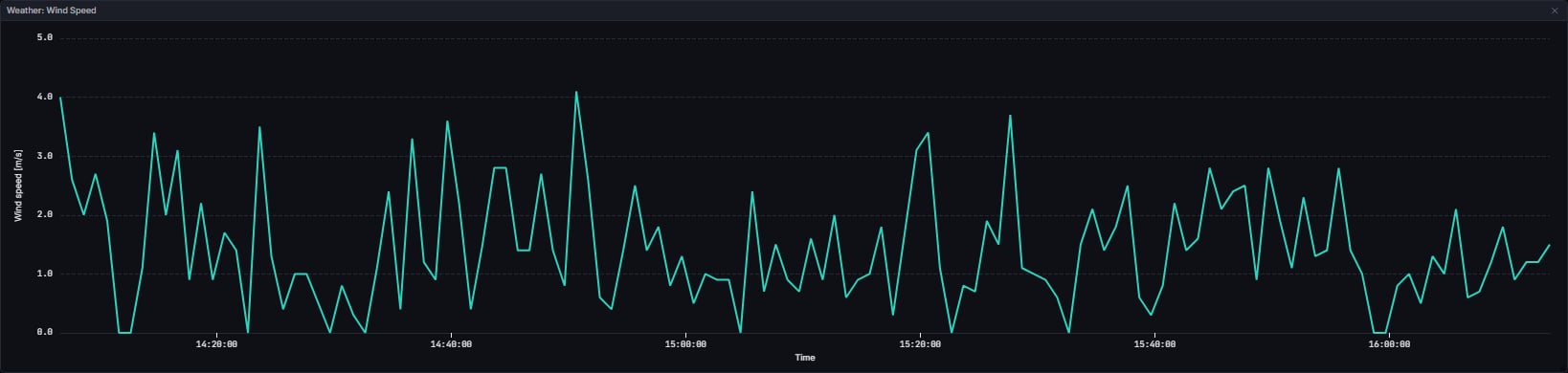
Each chart shares a circuit-local time-of-day x axis, and each plots only the readings at or before the playhead. Zooming. Right-drag across a plot to draw a box, and on release the chart zooms to it: both axes for Temperature and Wind Speed, the time axis only for Wind Direction and Rainfall, whose value axes are fixed. The drag carries on if the pointer leaves the plot or the chart, and the zoom lands at the last point inside the plot when you let go. A right-click without moving opens a small menu with Reset zoom. Left-drag is unchanged and there are no zoom sliders. The Humidity and Pressure charts in the palette behave the same way.Temperature
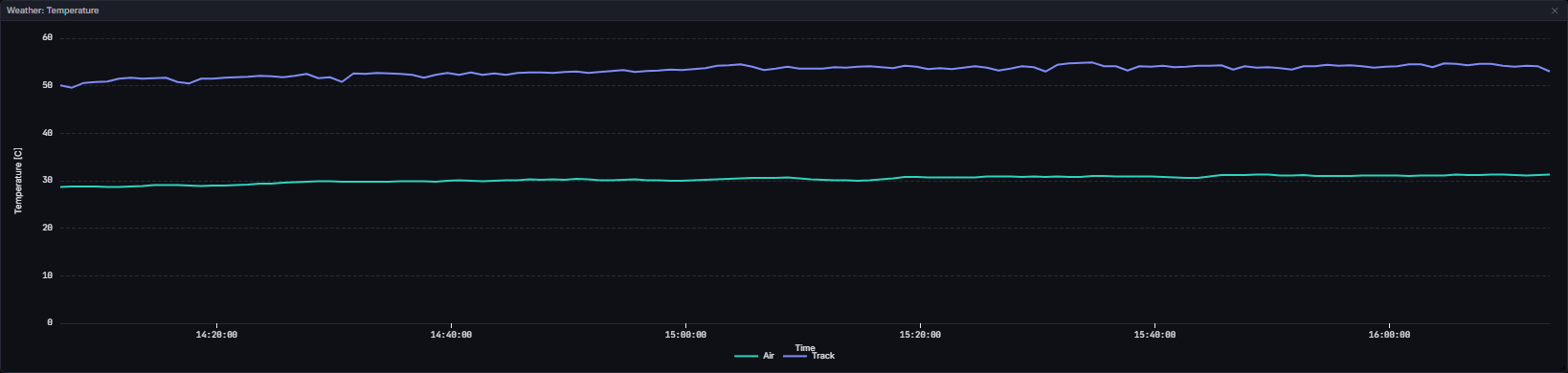
air_temp and track_temp columns. A reading missing one of the two drops out of that series only; the other still plots.
Wind Speed
Wind Direction
Rainfall

rainfall column is a 0 or 1 flag, so it is drawn as a step that holds between samples and labelled Dry and Wet. A straight line between the two would draw a gradual transition that never happened.
Data Behind It
All four charts are client-derived, with no insight metric behind them.screens/derive.ts’s buildWeatherCharts builds all four options from one already as-of-filtered history array.
- WS channel:
weather, onvpw:v1:{session_key}:weather, defined inlibs/vpw-contracts. - REST hydration:
GET /v1/sessions/{session_key}/weather, an offset-paged row endpoint read on session enter and re-read on a reconnect or aseek. - Full history: the store keeps every weather row for the session, and
weatherHistoryAsOfgates them by the playhead at read time. - Field names: the real weather columns are
air_temp,track_temp,wind_speed,wind_direction,humidityandrainfall. - Honest gaps: a reading missing a given field drops out of that field’s series only. Nothing is ever interpolated to fill a gap.
- Clocks: the time axis and the tooltip header both render circuit-local time from the session’s own
gmt_offset, falling back to the browser’s local time only when the session carries no usable offset. - Live and replay envelopes are wire-identical; the widgets never branch on envelope
source.
States
FAQ
Why is air or track temperature empty on a backfilled weekend?
Why is air or track temperature empty on a backfilled weekend?
Some FastF1-backfilled sessions carry weather rows with no temperature values at all. The chart shows its empty state rather than inventing a line. The live-sourced copy of the same session usually has them.
Why does rainfall only ever read Dry or Wet?
Why does rainfall only ever read Dry or Wet?
Because the source column is a 0 or 1 flag, not a rate. There is no millimetre figure on the wire to plot.
Why did wind direction jump from 5 degrees to 355?
Why did wind direction jump from 5 degrees to 355?
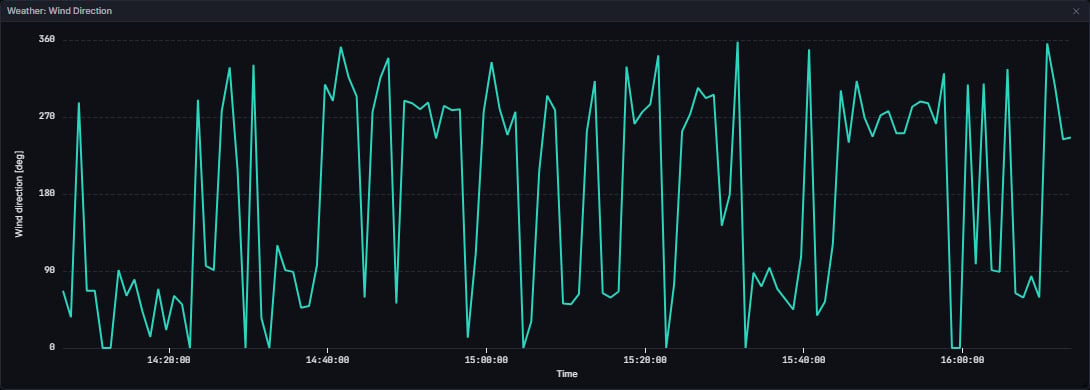
It did not jump physically. The axis is a straight 0 to 360 line, so a small veer across north draws as a full-height sweep.
Next Steps
Weather
The same data as a compact as-of readout.
Race Control
What race control said as conditions changed.
Track Evolution
How the surface itself responded.
Tyre Strategy
What the field fitted as the weather moved.