

Overview
The Track Map is Watchparty’s plan-view of the circuit: the outline of the track with a dot for every car at its as-of position, each carrying a callout label so overlapping cars stay readable. Reach for it when you need to see where cars actually are on track, for example during a safety car bunch-up or a pit-lane queue, rather than just their timing order.Car positions need both a matched circuit outline AND a fitted calibration. A session can have one without the other, and the widget says exactly which is missing rather than guessing a transform.
What It Shows
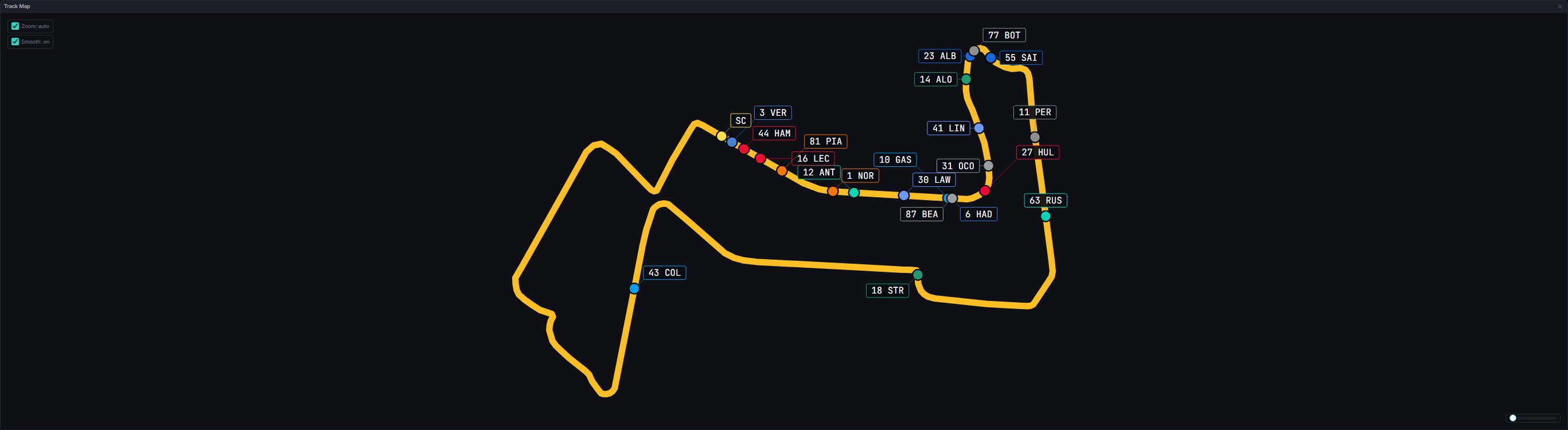
{driver number} {TLA}”, or the bare number when no code is available) nudged clear of every other callout, every car’s own dot, and the track outline itself, with a thin leader line back to the dot it belongs to.
The outline itself is the flag: it takes the colour of the track status at the playhead, using the same flag colour tokens as the Timing Tower’s own status, so the two can never disagree about what the track is doing. An unrecognised or absent status draws white, the same as green.
How cars move. Position samples arrive every couple of seconds live. With Smooth on, a new sample is drawn as soon as it arrives, and between samples the car glides forward along the track at its measured speed, for no longer than the gap to the next sample is expected to last, then holds. A car never moves backwards: if the drawn position is ahead of the truth it eases down, and if it is behind it catches up along the track rather than cutting across a corner. Cars are snapped onto the circuit outline, except in the pit lane or when a sample is clearly off the outline, where they are drawn at the raw position. A seek or a large jump snaps immediately, and a replay glides on the playhead clock, so faster playback speeds stay correct. The map works out each circuit’s direction of travel from the cars themselves, so an outline drawn against the direction of travel still moves the right way.
The safety car. The position feed reports the safety car under one of three spare car numbers, and which one differs from event to event. Whichever of the three carries a real position is drawn as the yellow “SC”; the other two, which sit at a zero position, are never drawn.
Callout placement is deterministic: for each car, in a fixed processing order, candidate boxes are tried on an eight-point compass at increasing radii, preferring a spot outside the circuit’s own loop and clear of every obstacle. There is no hover tooltip and no click interaction on the map itself; the local controls are the rotation slider, the zoom-on-select and smoothing toggles and, in qualifying, the knockout filter.
Data Behind It
Car positions come fromcar_location rows: a bounded window around the client-side playhead (60 seconds behind to 120 seconds ahead, refetched with 15 seconds of margin) hydrates over GET /v1/sessions/{session_key}/location, and the live WebSocket location channel keeps that window current as new rows arrive. Live and replay are wire-identical; the widget never branches on envelope source. A refetched window is merged into the samples already held rather than replacing them, so a refetch never makes a car jump back.
The circuit outline itself is a static asset, not session data: vendored circuit geojson served from the app’s own origin, never the gateway. Resolving which outline (and calibration) a session uses is a two-step, exact-match lookup, never a fuzzy one:
circuit_key(the integer OpenF1 carries on live session rows) against a committed registry.- Verbatim
circuit_namestring match, as a fallback. FastF1-backfilled sessions carrycircuit_keyasNULL, so every backfilled session resolves through this name-based path instead.
src/circuits/registry.ts), each entry fitted from a real session’s car_location rows and provenance-commented with which session_key it was verified against and the fit’s residual. An unmapped circuit_key/circuit_name or a circuit with no calibration degrades explicitly; there is no runtime fitting and no guessed match.
Every 2026 round now carries a registry entry. The remaining rounds were pre-fitted ahead of their weekends by circuit name only, because a live session’s circuit_key is not known until the first session runs, so each of those gains its key-based entry once its first practice session has been seen.
States
No track geometry for this circuit
No track geometry for this circuit
The session’s circuit_key/circuit_name has no registry entry at all. Shown before any car data is even considered.
Loading track geometry
Loading track geometry
The circuit outline asset fetch is still in flight.
Track geometry failed to load
Track geometry failed to load
The outline asset request errored, or projection produced no usable points.
No car location data at this playhead position
No car location data at this playhead position
Geometry and calibration are both fine, but no driver has a location row inside the current window.
Live vs replay
Live vs replay
Wire-identical: both publish the same
location channel envelope shape, and the widget never branches on it.Session type gating
Session type gating
None. The Track Map is available for every session category.
FAQ
Why does a car's callout sit oddly far from its dot?
Why does a car's callout sit oddly far from its dot?
The layout search widens outward ring by ring until it finds a box clear of every other callout, dot, and the track line itself. A crowded pack (start grid, a safety-car bunch, a pit queue) pushes some callouts further out than usual; this is expected, not a bug.
Why are there no cars at all on a circuit I know has live data?
Why are there no cars at all on a circuit I know has live data?
Check the notice text first. “Circuit not calibrated” means the outline is fine but no fit exists yet; “No car location data at this playhead” means the window around the current scrub position genuinely has no rows for any driver.
Next Steps
Track Dominance
The same circuit outline, coloured by which loaded lap was quicker through each section.
Telemetry
Load the laps whose speed and inputs you want to compare.
Timing Tower
The pit chip this widget’s “P” callout extension shares its source with.
Data Journey
How live and replay sources reach every widget identically.