

Overview
The Timing Tower is Watchparty’s running-order pylon. It is the first widget most engineers open on a session, since it answers “who is where” at a glance: position, gap, tyre, and sector progress for every car.A race takes its order and gaps from the timing feed’s own interval fields whenever that feed covers the running field, and from cumulative measured lap and sector times when it does not. The header says which of the two you are looking at. Neither basis ever derives a position or a gap from a received timestamp.
What It Shows
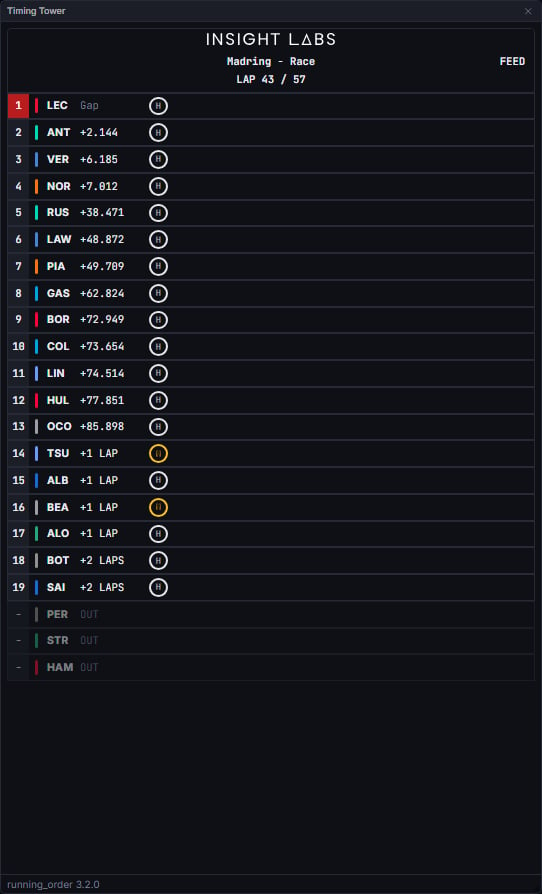
Session type changes the row layout and the ordering rule:
- Race - compact rows (no sector bar), ordered by on-track position.
- Practice / qualifying / sprint qualifying - detailed rows (sector bar shown), ordered by ascending best lap time. Qualifying additionally marks knocked-out drivers.
- Click a row to select that driver for the Lap Times comparison chart. Ctrl-click (or Cmd-click on a Mac) adds another driver to the same comparison instead of replacing the selection.
- Right-click the tower to switch the time column between Gap to leader and Interval to ahead. Interval is offered only where rows actually carry one, which means races.
- Right-click a tyre badge to open the compound picker and correct that stint’s compound by hand. The same picker opens from the Stints viewer and the Tyre Strategy widget, where the whole stint is on screen.
Data Behind It
The tower’s ordering, gaps, retirement and knockout state come from therunning_order insight (model_id: running_order, model_version: 3.2.0), delivered over the WebSocket channel vpw:v1:{session_key}:insight:running_order. The metric recomputes the whole field on every new_lap, new_sector, or tick (a 30-second bound so the pylon never stalls when a degraded lap feed goes quiet).
- Race, feed basis (the first choice): OpenF1’s own
gap_to_leaderandintervalfields drive order and gaps whenever the feed covers the running field. The snapshot’sbasisreadsfeed, and the header chip says FEED. - Race, cumsum basis (the fallback): order by furthest
(lap, sector)boundary crossed, gaps as the difference in cumulative measured time at the highest boundary both cars have crossed. The chip says CUMSUM. No common boundary yet means a genuinely unknown gap, never a fabricated one. In a live race every car always has one lap in progress with no time yet; that single open lap does not blank the gaps, so gaps and intervals stay filled during the lap in progress. A driver whose gap really is broken, with an untimed lap earlier in their history, still reads as unknown. - Timed sessions: ordered ascending by best lap time; gaps are deltas to the fastest lap in the field.
- Retirement: a retired car is marked
outby the metric, sorts below every running car, and renders dimmed with a blank position. The judgement of who is out is the metric’s alone; the widget only renders it. - Lapped cars keep their true order, and every entry carries how many laps down it is.
Qualifying Rules
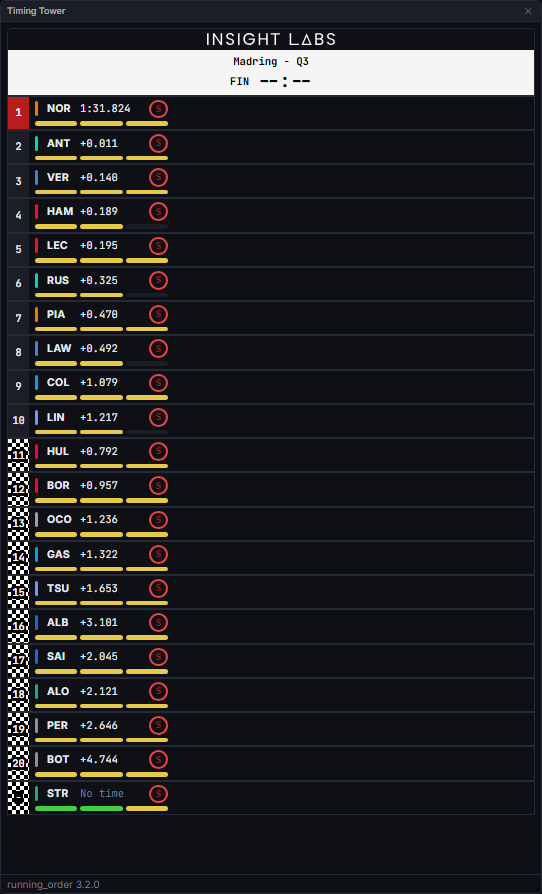
- Segment pool. A driver’s best lap is taken from the current segment only, bounded below by that segment’s own start marker. The pylon therefore shows the previous segment’s result until the next one genuinely begins, and the final resting state after the last flag is the last segment’s, never blank. A red-flag restart is not treated as a new segment.
- Deleted laps. A lap named in a race control deletion message is excluded from the best-lap ranking and from timed gaps. The exclusion is resolved from the message text, never from an untrusted row column.
- Pit-out laps are never a best lap.
- The 110% rule. A best lap slower than 110% of the field’s fastest is ranked and gapped as no time at all. The raw value still travels on the wire; only ranking and gapping change.
- Timeless drivers sort alphabetically by three-letter code, so a pylon full of cars yet to set a time is in an order the client and server independently agree on.
- Knockouts are ranked on the whole-session order rather than the current segment’s pool, and a knocked-out driver keeps the position and gap they were eliminated on rather than drifting as later segments run.
States
Empty / no timing data
Empty / no timing data
Renders “No timing data” rather than a placeholder grid, until at least one driver has a lap or position row.
Live vs replay
Live vs replay
Wire-identical: both sources publish the same
insight:running_order envelope shape, and the widget never branches on it.Session type unresolved
Session type unresolved
If the session’s category cannot be positively classified as race or timed, the insight withholds output entirely rather than guessing; the tower shows whatever the client-side fallback can derive in the meantime.
Practice: untimed lap 1
Practice: untimed lap 1
Every driver’s first practice lap is an untimed garage pit-out. The metric scans every lap for laps completed and best lap time regardless, so this does not blank the field.
Cumsum fallback (race only)
Cumsum fallback (race only)
When the feed does not cover the running field, the tower falls back to the measured cumsum basis and the chip reads CUMSUM. Gaps then exist only between cars with a common crossed boundary.
Retired and unmeasurable cars
Retired and unmeasurable cars
A retired car dims, blanks its position and reads OUT. A car still running but with no measurable gap renders almost identically, with its own reason in the row title, because the two facts are not the same.
Qualifying knockout
Qualifying knockout
An eliminated driver’s position cell takes a chequered background, with the finishing position still legible on top of it.
FAQ
Why is the gap column showing a dash?
Why is the gap column showing a dash?
A gap is only shown when the active basis actually supports one: a feed reading, or a measured boundary both cars have crossed. No common basis means a genuinely unknown gap, never a fabricated one.
What is the FEED / CUMSUM chip telling me?
What is the FEED / CUMSUM chip telling me?
Which basis produced the order and gaps you are reading. FEED is the timing feed’s own intervals, the first choice for a race. CUMSUM is the measured fallback, used when the feed does not cover the running field.
Why is a driver ranked with no time when they clearly set one?
Why is a driver ranked with no time when they clearly set one?
In a timed session, a lap slower than 110% of the field’s fastest, or a pit-out lap, is not treated as a representative best lap. The lap still exists everywhere else in the app.
Can I correct a wrong tyre compound?
Can I correct a wrong tyre compound?
Yes. Right-click the badge and pick the right compound. The override is marked, and it applies everywhere that stint appears.
Next Steps
Lap Times
Compare drivers selected from the tower on a lap-time chart.
Laps
The full lap-by-lap log behind the tower’s own data.
Race History
A whole-field view of gap-to-leader-average over the race.
Insights and Versioning
How model IDs, versions, and degradation rules work across Watchparty.