

Overview
Track Dominance takes exactly two loaded laps and paints the circuit outline in whichever driver’s colour was quicker through each defined corner, straight, or section. Reach for it when you want to see WHERE on the lap a time gain came from, not just how big the gain is overall.This widget compares exactly two laps, never more. Load a third and it shows a notice asking you to remove one, even though the Telemetry widget on the same tab can hold up to five.
What It Shows
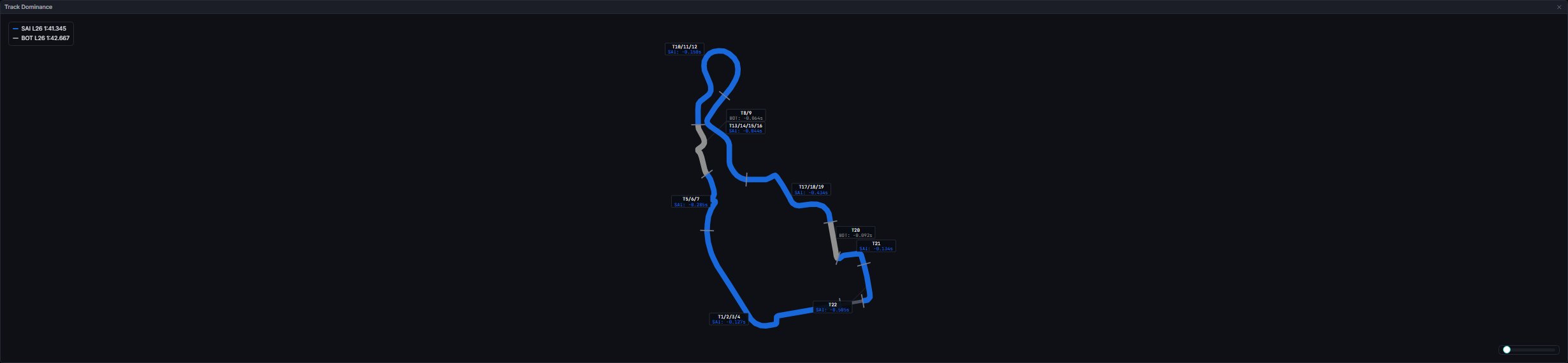
Interactions: this widget is itself a drop target. Drag a row from the Laps table onto it (or onto the Telemetry widget on the same tab) to load a lap; both widgets on a tab share the same loaded-lap state, so a tab holding only Track Dominance can still be fed. There is no hover tooltip; the permanent callouts and legend are the widget’s only readouts.
Data Behind It
Track Dominance computes entirely client-side from laps already loaded into the Telemetry comparison on the same tab; it reads no channel or endpoint of its own beyond the circuit outline. For each defined element, it re-derives section time from the two loaded traces’ own telemetry points (the same fetched-per-lapcar_telemetry data the Telemetry widget uses), picks the smaller non-null time as the winner (ties keep the earlier-loaded lap), and shifts each element’s arc-length range by the circuit’s startOffset so the painted sections line up with the real start/finish line.
The circuit outline resolves exactly as it does for the Track Map: circuit_key first, then a verbatim circuit_name match, against the same committed registry. This widget does not need a fitted calibration, only the outline geometry, since it draws the outline itself rather than placing a car on it.
Section boundaries come from a separate per-circuit track definition (metres into the lap, not fractions), committed alongside the circuit registry. Only circuits with an authored definition carry one; every 2026 round now has one.
Both laps are sector-anchored first. Each lap’s distance axis is pinned to the circuit’s own canonical sector lines using that lap’s measured sector times, the same alignment the Telemetry widget applies, so a section’s boundaries fall at the same point of the circuit on both traces rather than drifting apart down the lap.
Pit laps are excluded. A pit-in or pit-out lap is never aligned and never compared here: its distance profile is not a lap of the circuit, and painting it would attribute a pit lane transit to a corner.
States
No track geometry for this circuit / Loading track geometry / Track geometry failed to load
No track geometry for this circuit / Loading track geometry / Track geometry failed to load
Identical notice text and ordering to the Track Map widget, since it is the same underlying geometry fetch.
No track definition for this circuit
No track definition for this circuit
The outline resolved, but no authored section layout exists for it yet.
Invalid track definition
Invalid track definition
The definition file failed validation (a bad distance range, an out-of-bounds start offset). Surfaces the validator’s own reason verbatim rather than a partial or guessed layout.
Load at least two laps in the Telemetry widget to compare
Load at least two laps in the Telemetry widget to compare
Fewer than two ready lap traces are loaded on this tab.
Track Dominance compares exactly two laps - remove laps until two remain
Track Dominance compares exactly two laps - remove laps until two remain
More than two ready laps are loaded; the widget refuses to guess a pair.
5 laps maximum notice
5 laps maximum notice
Shown when a drop is rejected because the tab already holds the Telemetry widget’s own cap of five laps.
Live vs replay
Live vs replay
No direct dependency on either: the widget only reacts to whichever laps are already loaded, which themselves hydrate identically regardless of source.
Session type gating
Session type gating
None, deliberately: unlike Race History or Pit Window, Track Dominance works from whichever laps are loaded on the tab, in any session type.
FAQ
Why is a section grey when I have two laps loaded?
Why is a section grey when I have two laps loaded?
That element has fewer than two measurable section times, most often because one lap’s telemetry trace never covered that part of the track. A winner is never crowned from a single measurement.
Why do two sections show the same colour with different patterns?
Why do two sections show the same colour with different patterns?
A flat stroke and a striped stroke of the same colour mean two different loaded laps happen to share that colour (team-mates, or the same driver twice). Check the legend and the callout’s driver code to tell them apart.
Next Steps
Track Map
The GPS view this widget shares its outline and rotation control with.
Telemetry
Load laps here (or drop them straight onto this widget) to feed the comparison.
Laps
Drag a row from here onto either widget to load its lap.