

Overview
The Weather widget (registry idweather, built by WeatherStrip) shows the most recent weather reading as of the playhead as a row of stat tiles. Reach for it to check conditions at a given point in the session, for example whether rain arrived before a round of pit stops.
The store keeps the session’s whole weather history, so scrubbing the playhead backwards shows the reading that was current at that moment, not an empty strip. For the shape of a change over time, use the four Weather Charts.
What It Shows
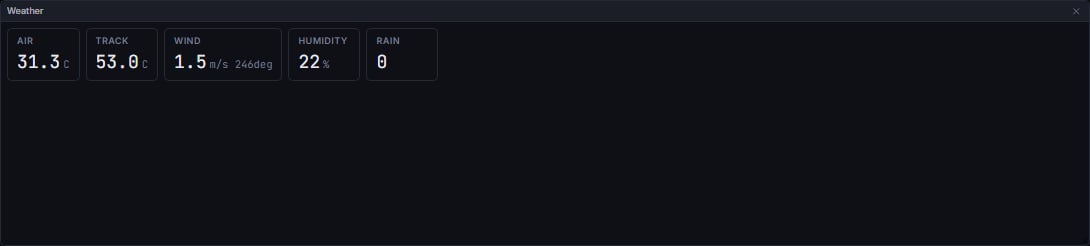
Any field that is missing or not a finite number renders its tile as a dash, never a fabricated zero.
Data Behind It
Weather is entirely client-derived, with no insight metric behind it.- WS channel:
weather, part of the Section 5 envelope family (vpw:v1:{session_key}:weather) defined inlibs/vpw-contracts. - REST hydration:
GET /v1/sessions/{session_key}/weather, an offset-paged row endpoint, read bySessionController.enteralongside the other row endpoints and re-read on a WS reconnect or aseek. - A retained history, not a single slot. Every envelope is appended to the session’s weather history. The
weatherHistoryAsOfselector filters that history by the playhead cutoff, andweatherAsOfpicks the latest surviving reading for this strip. The four chart widgets read the same filtered history. - Column names: the weather table’s real columns are the short forms
air_tempandtrack_temp, not the longerair_temperatureandtrack_temperature. - Live and replay envelopes are wire-identical; the widget never branches on envelope
source.
States
FAQ
Why are Air and Track blank on some backfilled sessions?
Why are Air and Track blank on some backfilled sessions?
FastF1-backfilled weather rows can carry no temperature values at all. The tiles show dashes rather than inventing a figure. The live-sourced copy of the same session usually has them.
Does this update while the playhead moves?
Does this update while the playhead moves?
Yes. The strip always shows the latest reading at or before the playhead, so it changes as you scrub.
What does Rain = 1 mean?
What does Rain = 1 mean?
The feed reports rainfall as an on or off flag rather than a rate, so 1 means wet and 0 means dry. There is no millimetre figure on the wire.
Next Steps
Weather Charts
The same readings plotted across the whole session.
Race Control
Official messages issued as conditions changed.
Timing Tower
How the field responded to the conditions.
Stints
Tyre choices against the weather at the time.