

Overview
The Corrected Laps Plot shows the exact fuel- and evolution-corrected lap series each loaded stint’s fit consumed, one point per lap. Reach for it when a fit on the Deg Fit Plot looks off and you want to see, and adjust, the laps behind it: click any plotted lap to exclude or include it from the fit.This plot shares its stint selection with the Deg Fit Plot. A stint dropped on either appears on both.
What It Shows
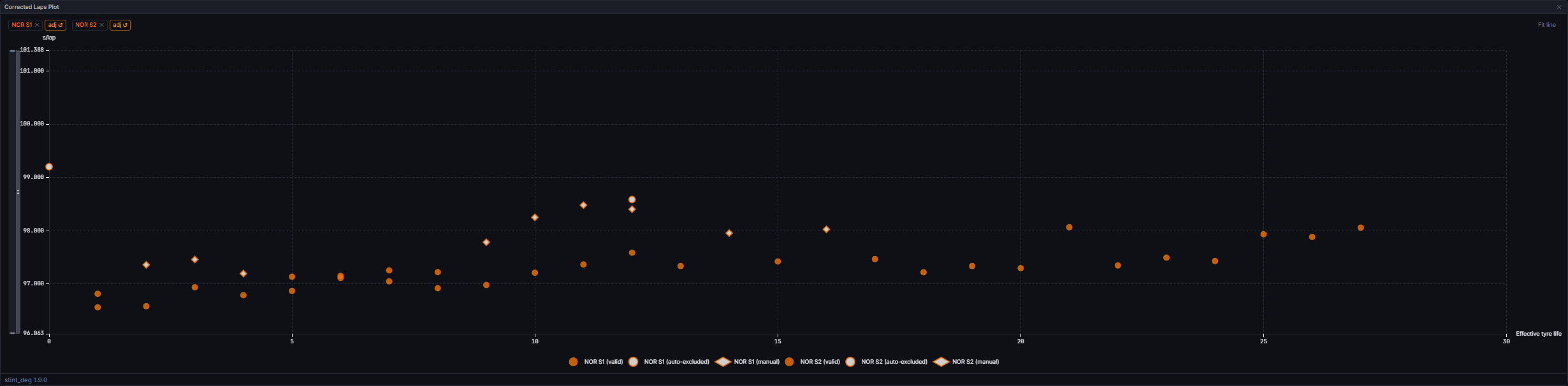
An existing override always clears first: click a manually excluded or included lap once to revert it to automatic, before a further click would apply a new direction. The tooltip on every point names the lap number, its corrected time, and (for auto-excluded or included points) the reason, for example “auto-excluded (over_cutoff)” or “included (sc)”.
A Fit line toggle above the plot (off by default) overlays the same fitted line the Deg Fit Plot draws, using the same team-colour and dash-cycle rules, so you can see the fit move as you exclude or include laps. Clicking a fit line or empty space does nothing.
Zooming. Right-drag across the plot to draw a box, and on release the chart zooms both axes to it. The drag carries on if the pointer leaves the plot or the chart, and the zoom lands at the last point inside the plot when you let go. A right-click without moving opens a small menu with Reset zoom, which returns the chart to its opening view. Left-click on a lap still toggles its exclusion, and there are no zoom sliders.
The same chip row, drag target, and adj/reset affordances as the Deg Fit Plot apply here (see that page). Up to six stints can be loaded at once; a seventh drop is silently rejected.
Data Behind It
Points are built from each driver’s latestinsight:stint_deg snapshot (model_id="stint_deg", model_version="1.9.0"), the same data the Tyre Deg Table and Deg Fit Plot read, hydrated live over insight:stint_deg and by REST (api.metrics(sessionKey, "stint_deg")) on session enter and rehydrate.
The manual override workflow. A click sets or clears a lap’s override in a client-side map, keyed per session. Nothing is sent to the server until you click Save on the Tyre Deg Table’s header bar. The client-side refit that redraws the fit line and this table’s *-marked rows mirrors the server’s post-correction fit maths exactly: it never re-derives the fuel or evolution correction itself (see Fuel Correction), only the fit that runs on top of the wire’s own evolution_corrected_s values.
Saving. Save PUTs the full desired override set to PUT /v1/sessions/{session_key}/exclusions, each entry a (driver_number, stint_number, lap_number, direction) tuple with direction either "exclude" or "include". This is a replace-set write, not a delta: the body is the complete list of overrides you want active. The response re-reads the persisted state from the database rather than echoing the request. On success, the working set becomes the new saved baseline; on failure, your local edits are left untouched and the bar shows a “Save failed, retry” caption.
States
Empty
Empty
“Drag a stint from the Tyre Deg Table” shows until at least one loaded stint has a plottable lap.
Lap with no corrected time
Lap with no corrected time
Never plots and never offers the click affordance; there is no way to override a lap the fit itself could never have consumed.
Unsaved manual edits
Unsaved manual edits
Toggling a lap updates the plot and the Tyre Deg Table’s
*-marked row immediately, client-side, with no network call. The Tyre Deg Table’s header bar shows Adjusted until you Save or Discard.Saved, reconciling, canonical
Saved, reconciling, canonical
After a successful Save the bar reads Reconciling until the next
race_pace snapshot’s own echo catches up, then Canonical. See the Tyre Deg Table States section for the full three-state rule.Session gating: race and practice, never qualifying
Session gating: race and practice, never qualifying
The widget runs on race and practice sessions, and renders a not-applicable state in qualifying, where the metric itself returns nothing. Same rule as the Tyre Deg Table.
Live vs replay
Live vs replay
Identical: the click-to-toggle workflow and the save endpoint behave the same regardless of whether the session is live or replayed, since both publish the same stint_deg envelopes.
FAQ
Why did excluding one lap change other laps' auto-excluded status?
Why did excluding one lap change other laps' auto-excluded status?
Excluding a lap removes it from the pool the outlier cutoff is computed against. Removing a lap can only raise that threshold, so a lap that was previously over the cutoff can become valid, and vice versa is never true for an exclude.
Does an included lap ever set the cutoff threshold?
Does an included lap ever set the cutoff threshold?
No. An included lap is force-admitted into the fit itself, but it never feeds the fastest-lap baseline the cutoff threshold is computed from.
Next Steps
Tyre Deg Table
See the fit numbers and save/discard your manual overrides.
Deg Fit Plot
The fitted line these corrected laps feed.
Fuel Correction
How the corrected lap times plotted here are derived.
Insights and Versioning
How model_id and model_version work across the insight engine.