

Overview
The Telemetry widget (TelemetryCompare) plots loaded laps across five stacked panes so you can compare exactly how two or more laps differ, not just by how much. Reach for it whenever a gap on the timing tower needs explaining: where on the lap it opened up, and in which channel.
There is no DRS or steering channel anywhere in this platform: OpenF1’s car data carries neither. The five panes are Gear, Speed, Throttle, Brake and a computed Time Delta, top to bottom.
What It Shows
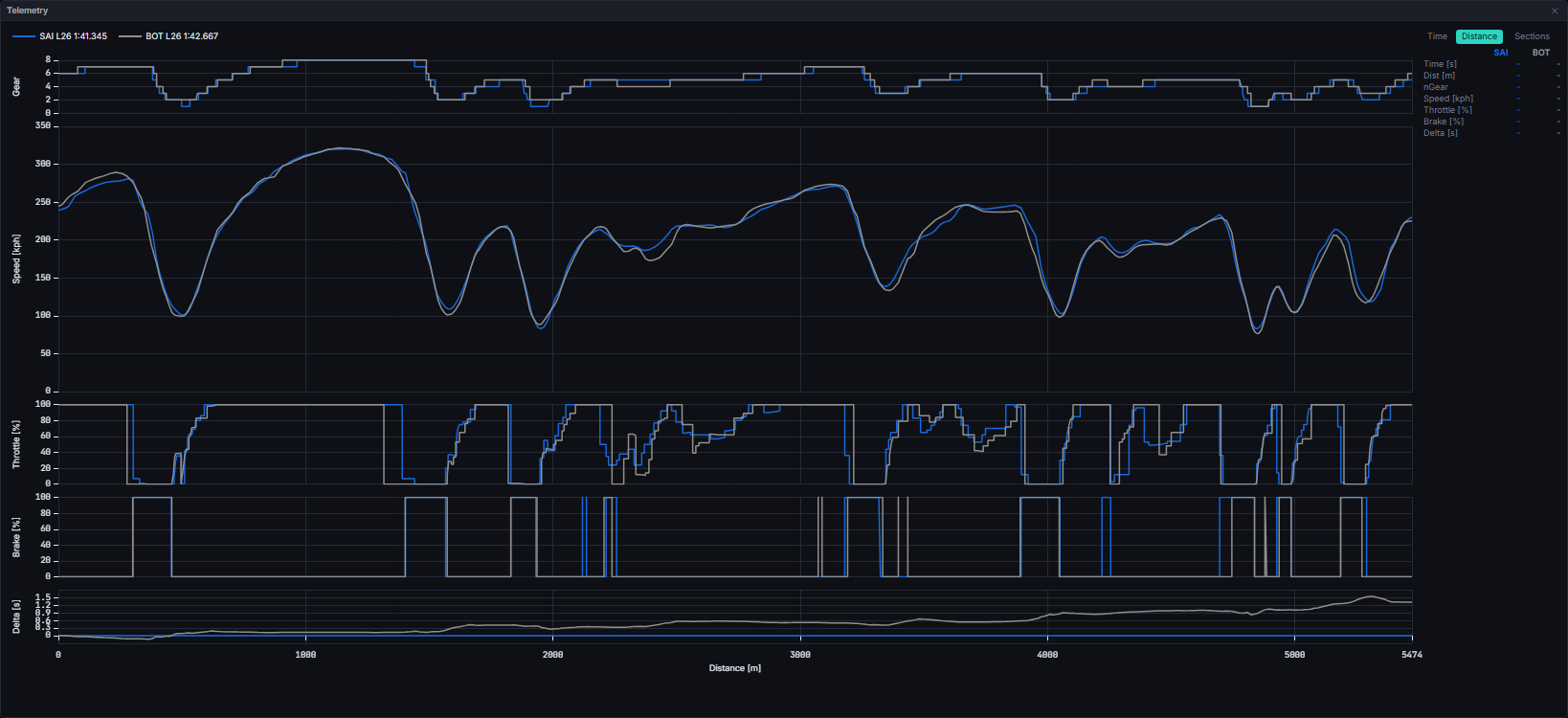
Each loaded lap gets a legend entry (swatch plus label) at the top: solid, dashed, or dotted line style, cycling for laps that resolve to the same team colour (team-mates, or two laps of the same driver) so they stay tellable apart. A readout table to the right of the chart shows every channel’s value at the current cursor position, one column per loaded lap: the value on the plotted axis is read exactly, and the other axis is interpolated. The read-out always reads the unsmoothed samples.
Interactions:
- Drag a row from the Laps table onto the widget to load it (up to 5 laps at once); drag again onto Track Dominance on the same tab, which shares this loaded-lap state.
- Time / Distance toggle, top right; switching axis resets the cursor and any in-progress zoom or alignment.
- Left-click anywhere in the chart sets a sticky cursor, read out in the table.
- Right-drag zooms the x-axis only, to the selected range. The drag carries on if the pointer leaves the plot or the chart, and the zoom lands at the last point inside the plot when you let go. A right-click without a meaningful drag opens a small menu with Reset zoom, which returns to the full domain; the click changes nothing until you choose it. This is the same menu the other charts show, but Telemetry zooms along x only.
- Right-click a legend entry opens an “Align” menu; once armed, a left-drag nudges that lap’s whole trace along the current axis (a manual per-lap offset, kept independently for time and distance) to correct for e.g. a mistimed lap start. A confirmed non-zero offset shows a reset control.
- A degraded-at-source lap’s legend entry carries an amber warning glyph; see States below.
Data Behind It
Each loaded lap is fetched once, on demand, overGET /v1/sessions/{session_key}/telemetry?driver_number=&start=&end= - a bounded window from the lap’s own date_start to date_start + lap_time (or the next lap’s start as a fallback when lap_time is null). Results are cached per (driver, lap) for the session; a failed fetch is cached as “failed” so the layer reads as no-data rather than a stuck spinner, and removing then re-dropping the lap is the retry path. There is no WebSocket telemetry channel subscription: lap rows arrive on the existing laps channel, and the trace itself is always fetched on demand rather than streamed.
Distance-into-lap is derived entirely client-side, a left-Riemann integral of speed over the lap window, because car_telemetry stores no distance column at source. This is a deliberate, flagged deferral: when a stored distance column lands, this derivation is dropped in favour of it and nothing else about the widget changes.
Sector-anchored alignment. Two laps of the same circuit rarely integrate to exactly the same distance, so before they are drawn each lap’s distance axis is pinned to the circuit’s own canonical sector lines, using that lap’s measured sector times as knot points and anchoring the end at the official lap time. Two traces therefore line up at the same corner rather than drifting apart down the lap. Each lap reports its own verdict:
A lap can be unaligned for an honest reason: the circuit has no track definition, the definition has no measured sector lines, the lap has no sector times, or the trace itself is unusable. A pit lap is never aligned, in or out, because its distance profile is not a lap of the circuit. Pit laps and degraded traces are also flagged in their own right, without changing where the alignment pins sit.
Display smoothing. The speed and throttle traces are lightly smoothed along distance for legibility, with a gaussian kernel at 15 metres for speed and 2 metres for throttle. Gear, brake, the delta pane and the read-out table are never smoothed. The smoothing is display only: a missing sample stays missing and lends nothing to its neighbours.
States
FAQ
Why does the Time Delta pane show a gap partway through one lap?
Why does the Time Delta pane show a gap partway through one lap?
A point plots only where it falls inside the reference lap’s own distance or time coverage. A reference lap that ended early (or a comparison lap that ran further) leaves the pane genuinely blank there rather than extrapolating.
Why do two laps line up at every corner now?
Why do two laps line up at every corner now?
Each lap’s distance axis is pinned to the circuit’s own sector lines using that lap’s sector times, so the same corner sits at the same distance on both traces. A lap that cannot be pinned says so rather than pretending.
Is the speed trace the raw data?
Is the speed trace the raw data?
The plotted speed and throttle lines are lightly smoothed for legibility. The read-out table beside the chart always shows the unsmoothed sample, so any number you quote is the real one.
Next Steps
Telemetry Degradation
The frozen-sample detection rule behind the warning badge and modal.
Track Dominance
See exactly two of these loaded laps mapped back onto the circuit.
Laps
Drag a row from here to load a lap into this widget.
Data Journey
How live and replay sources reach this widget identically.