

Overview
The Stint Lap Times viewer plots the actual lap times of whichever stints you have loaded onto it, one line per stint, against the lap’s position within that stint. It is the deliberately analytics-free companion to the Deg Fit Plot: no fitted line, no correction maths unless you ask for it, just the laps as driven.This viewer keeps its own stint selection. It is never unioned with the Deg Fit and Corrected Laps plots’ shared selection, so loading a stint here does not disturb them, and each workspace tab holds its own selection.
What It Shows
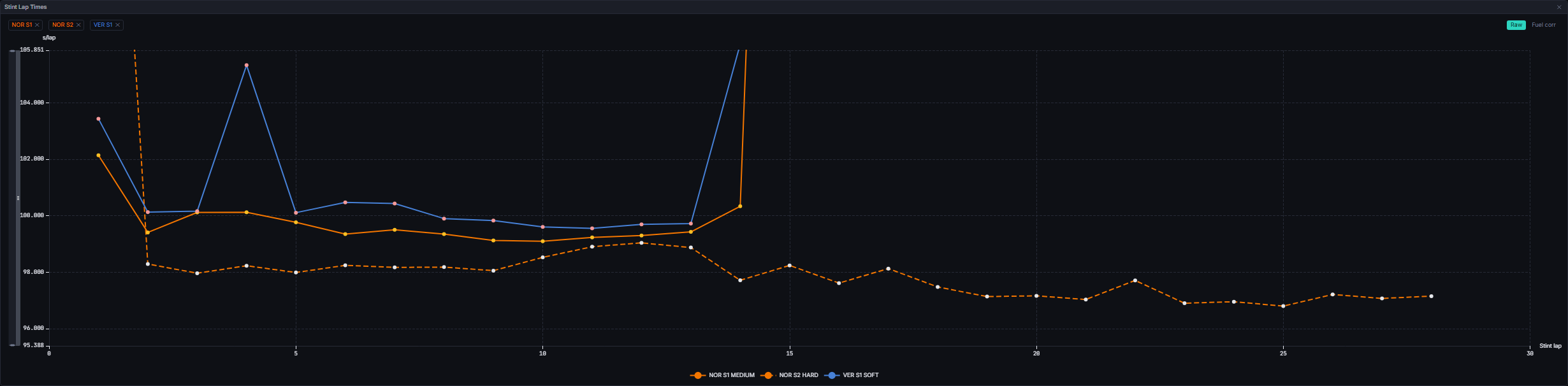
Load a stint by dragging its row out of the Stints Table. Remove one from the chip strip, or from the ✕ on the table’s own pinned row.
Zooming. Right-drag across the plot to draw a box, and on release the chart zooms both axes to it. The drag carries on if the pointer leaves the plot or the chart, and the zoom lands at the last point inside the plot when you let go. A right-click without moving opens a small menu with Reset zoom, which returns the chart to its opening view. Left-drag is unchanged and there are no zoom sliders.
Raw / Fuel corr. The toggle above the plot swaps which value is plotted. A lap with no value in the active mode is left out entirely rather than substituted from the other mode.
The axis does not move when you flick the toggle. The y bounds are the union of both modes’ values for the loaded stints, so switching basis rescales nothing. Those bounds span the flying laps of every plotted stint: a pit lap still plots at its real value but contributes nothing to the bounds, so one in-lap cannot flatten the whole comparison. A stint made up entirely of pit laps falls back to bounding on every plotted value.
Data Behind It
The viewer is a pure render over an ECharts option built byscreens/derive.ts’s buildStintLapTimeOption, from the same as-of clamped rows the Stints Table renders.
- Raw mode plots each lap’s own
lap_timefrom the hydratedlapsrows. - Fuel-corrected mode reads the
corrected_lapsinsight (model_id: corrected_laps,model_version: 1.4.0), the same source the Laps table and Lap Times chart read. The correction maths is never re-derived here; see Fuel Correction. - A selection whose driver and stint have no matching as-of row contributes no series at all, rather than a placeholder.
- Live and replay envelopes are wire-identical; the widget never branches on envelope
source.
States
FAQ
Why does the x axis start at 1 for every stint?
Why does the x axis start at 1 for every stint?
So stints of different ages line up for comparison. Lap 1 of a stint is the first lap on that set of tyres, whichever race lap it happens to be.
Why is one point hollow?
Why is one point hollow?
Race control deleted that lap. It stays on the plot because it was really driven, and hiding it would quietly change what the stint looks like.
Why did loading a stint here not load it on the Deg Fit Plot?
Why did loading a stint here not load it on the Deg Fit Plot?
By design. This viewer keeps a separate selection, so you can hold a raw comparison here and a fitted comparison there at the same time.
Next Steps
Stints Table
The drag source for this viewer.
Deg Fit Plot
The fitted degradation view of a stint.
Lap Times
Whole-session pace comparison by driver rather than by stint.
Fuel Correction
What the Fuel corr basis is actually doing to these times.