

Overview
The Deg Fit Plot draws the fitted degradation line, corrected pace against effective tyre life, for whichever stints you have loaded onto it. It is a subject-stint plot: nothing is loaded by default, and you build up a comparison by dragging rows in from the Tyre Deg Table.This plot and the Corrected Laps Plot share one selection. A stint dropped on either appears on both, so you can toggle a stint in from one plot and immediately see it on the other.
What It Shows
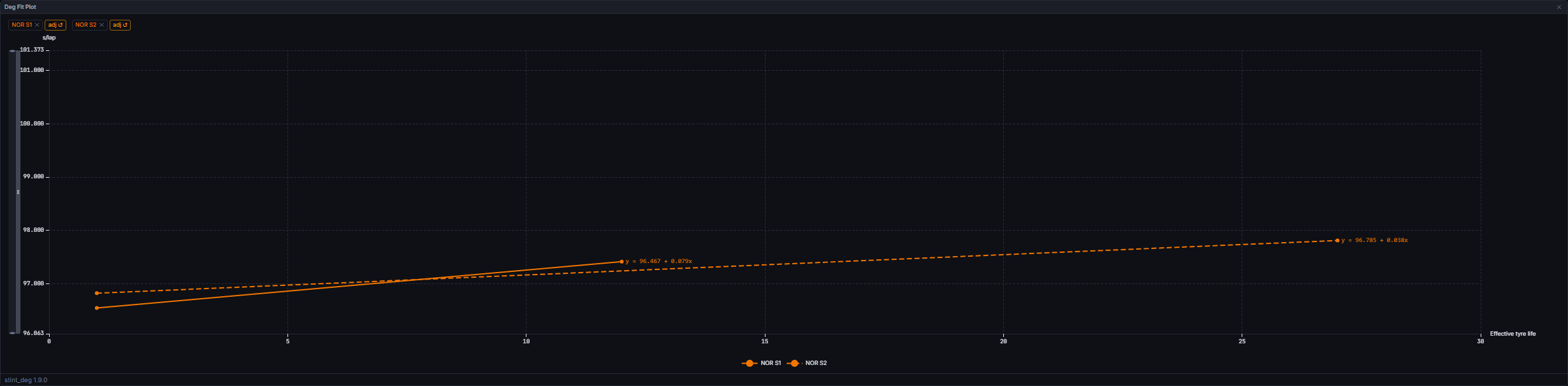
base_pace + life * gradient) rather than the raw lap time. A stint dropped without enough valid laps to fit is silently skipped, never given an invented slope.
Lines are coloured by team. Where two loaded stints resolve to the same colour, either two stints from one driver or two team-mates, the second and third get a dashed and dotted line respectively so they stay distinguishable; a fourth repeat of the same colour cycles back to solid.
Every line carries its own equation. The end of each fit line is labelled with that stint’s base pace and gradient, in the form y = 92.431 + 0.084x, in the line’s own colour, and the same figures appear in the tooltip. It displays the fit the table already holds; no second calculation happens here.
Zooming. Right-drag across the plot to draw a box, and on release the chart zooms both axes to it. The drag carries on if the pointer leaves the plot or the chart, and the zoom lands at the last point inside the plot when you let go. A right-click without moving opens a small menu with Reset zoom, which returns the chart to its opening view. Left-drag is unchanged and there are no zoom sliders.
A chip row above the plot lists every loaded stint (driver acronym and stint number, in team colour). Interactions:
Up to six stints can be loaded at once. Dropping a seventh is silently rejected rather than evicting an existing one.
Data Behind It
The plot is a pure render over an ECharts option built from the shared selection, each driver’s latestinsight:stint_deg snapshot (model_id="stint_deg", model_version="1.9.0"), and any manual lap overrides for the loaded stints. It reads no channel of its own: the underlying data hydrates exactly as described on the Tyre Deg Table page, over insight:stint_deg live and api.metrics(sessionKey, "stint_deg") on session enter and rehydrate.
A stint marked “adj” reflects a client-side refit against your manual lap overrides rather than the canonical server fit; the refit mirrors the server’s post-correction fit maths exactly (fuel and evolution corrections themselves are never re-derived here). See the Corrected Laps Plot for how those overrides are made and saved.
States
Empty
Empty
“Drag a stint from the Tyre Deg Table” shows until at least one dropped stint resolves to a plottable fit.
Dropped stint has no qualifying fit
Dropped stint has no qualifying fit
The stint is accepted into the selection (its chip appears) but draws no line, since it has no fit to draw. No error is shown.
Six stints already loaded
Six stints already loaded
A further drop is silently rejected; the stint already on the plot stays put. Remove a chip first to make room.
Session gating: race and practice, never qualifying
Session gating: race and practice, never qualifying
The widget runs on race and practice sessions, and renders a not-applicable state in qualifying, where the metric itself returns nothing. Same rule as the Tyre Deg Table.
Live vs replay
Live vs replay
Identical rendering: the option only depends on the current stint_deg snapshots and the local selection, both of which behave the same under live streaming or replay.
Next Steps
Tyre Deg Table
The drag source for this plot’s stints.
Corrected Laps Plot
The exact lap-by-lap series behind each fit, with manual lap exclusion.
Tyre Deg Ranking
Compare degradation across the whole field, per compound.
Insights and Versioning
How model_id and model_version work across the insight engine.