

Overview
The Pit Stops table answers “who has stopped, how often, and how long did it cost them” for the whole field at once. One row per driver, in the timing tower’s own current order, with a chip per stop showing the lap, the pit lane time and the tyre that went on.What It Shows
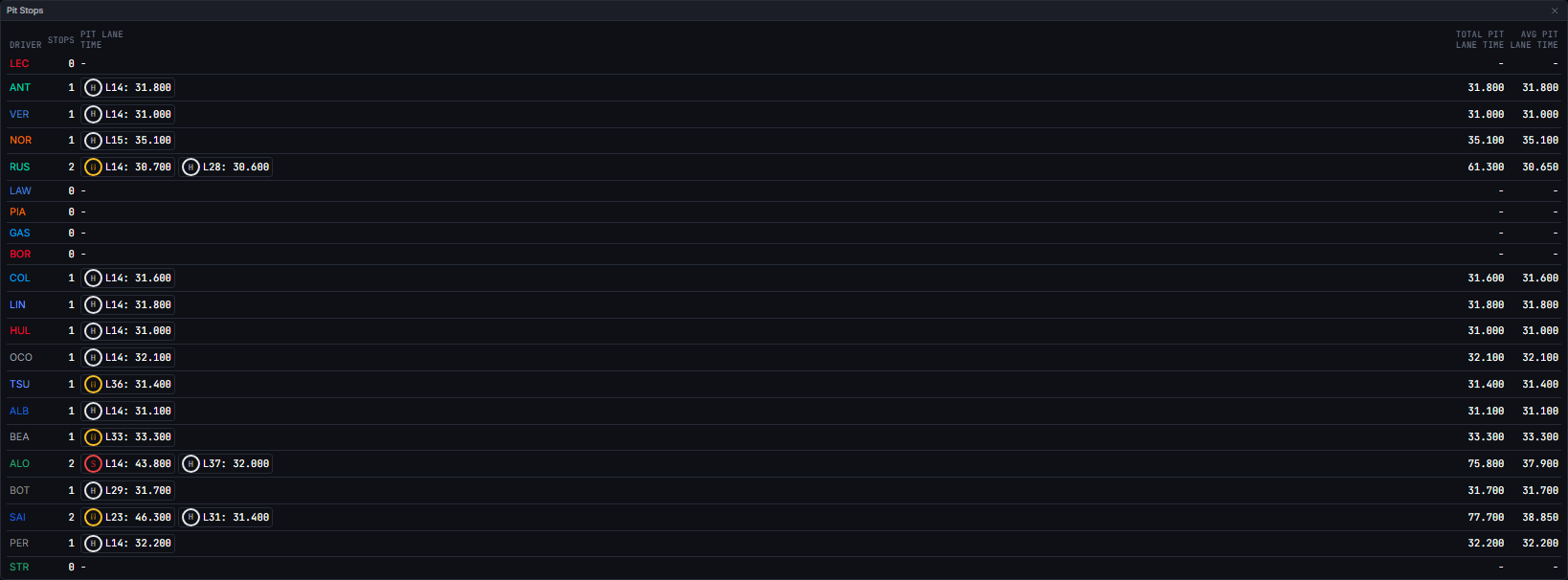
Every driver on track gets a row, including drivers who have not stopped yet: they show a genuine zero rather than being left out, which is the point of reading it as a field-wide picture.
Sorting. Stops, Total and Avg are sortable; a click cycles descending, ascending, then back to the tower’s own order. Driver is deliberately not sortable: the default order is the timing tower’s running order, and this widget never re-derives an order of its own. A driver with nothing to compare, no stops or no comparable stop for the average, always sorts last, so a zero-filled row can never look like the quickest total.
Stoppage parks are marked, not hidden. A stop at or beyond 300 seconds is a red-flag or suspension park, not a strategic stop. Those chips render muted, with a title saying why, and they still count in Stops, but they are excluded from Total and Avg. The reference case was the 2026 Dutch Grand Prix red flag, which parked the field for roughly 26 minutes against that session’s own 17 to 19 second lane transits.
Data Behind It
Pit Stops is entirely client-derived, with no insight metric behind it.screens/pitStops.ts’s buildStopsTable is a pure function of the hydrated pit and stint rows and the playhead cutoff.
- REST hydration:
GET /v1/sessions/{session_key}/pit, plus the stints rows used to resolve which tyre was fitted at each stop. - Live updates: pit rows arrive through the
timing-channel envelope reducer. - As-of gating: a pit row counts when its own
tsparses and is at or before the playhead. Unlike order and gap maths, which never touch feed timestamps, a pit row has no lap-time sum of its own, so its event time is the only honest cutoff available. - Ordering and identity come from the timing tower’s own entries, which is also where each row’s label and team colour come from. A driver in the tower with no stop row gets a zero-filled row; a stop row for a driver the tower does not know is appended after, by car number.
- Fitted compound: taken from the stint that begins at the rejoin. When the rejoin lap is not known yet the chip simply carries no badge, never a guessed compound.
- Live and replay envelopes are wire-identical; the widget never branches on envelope
source.
States
FAQ
Why is this number bigger than the stop time on television?
Why is this number bigger than the stop time on television?
Because it is a different measurement. Broadcast stop times are usually stationary time in the box, around two to three seconds. This is the whole pit lane transit, which includes the pit lane speed limit for the full length of the lane.
Why does a driver's Total not equal the sum of their chips?
Why does a driver's Total not equal the sum of their chips?
A stoppage-affected chip, or one with no reported duration, is excluded from the Total on purpose. The chips show everything that happened; the Total only counts strategic stops.
Can I sort by driver?
Can I sort by driver?
No, and that is deliberate. The default order is the timing tower’s own running order, and offering a second ordering here would mean re-deriving position outside the one place allowed to do it.
Next Steps
Tyre Strategy
Where each of these stops sits in the race’s strategic shape.
Pit Window
Judge the next stop against the cars around a driver.
Stints
The same stops as gaps between lap blocks.
Timing Tower
The running order this table is ordered by.