

Overview
The Race Control widget (registry idracecontrol, built by RaceControlFeed) is a scrolling log of official race control messages, newest first. Reach for it to see exactly when a flag was thrown, a safety car deployed, or DRS enabled, alongside the message text race control issued.
The flag word itself is never printed as text. It is carried entirely by the coloured pennant icons, so the same convention colours used elsewhere in the app (the stint flag overlay, the transport bar) apply here too.
What It Shows
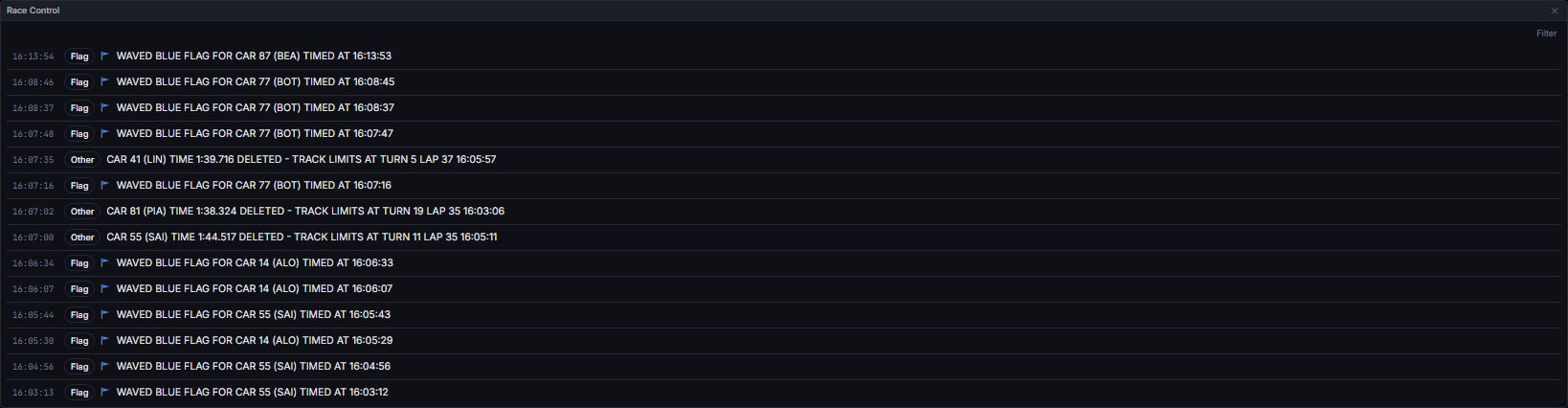
Recognised flags and their colours: green, yellow, double yellow, blue, red, chequered, black and white, safety car (SC) and virtual safety car (VSC). An unrecognised flag word, or a missing one, renders no pennant at all rather than a guessed colour.
Rows display in the order the store received them, reversed so the newest message is on top; this is append order, not a re-sort by timestamp.
Data Behind It
Race Control is entirely client-derived, with no insight metric ormodel_id/model_version behind it.
- WS channel:
race_control, part of the Section 5 envelope family (vpw:v1:{session_key}:race_control) defined inlibs/vpw-contracts. - REST hydration:
GET /v1/sessions/{session_key}/race_control, an offset-paged row endpoint.SessionController.enterreads it in parallel with the other row endpoints on session entry, and re-reads it on a WS reconnect or aseek. - The
raceControlAsOfselector filters the store’s rows to those whosetsis at or before the playhead cutoff, in the order the store received them;RaceControlFeedreverses a copy of that for display. - The clock renders the session’s own circuit-local time from its
gmt_offset, falling back to the browser’s local time only when the session carries no usable offset. - Live and replay envelopes are wire-identical; the widget never branches on envelope
source.
States
FAQ
Why does a Flag row show no pennant icon?
Why does a Flag row show no pennant icon?
Its flag value is not one of the recognised words (green, yellow, double yellow, blue, red, chequered, black and white, SC, VSC). Rather than guess a colour, the row shows the category badge and message with no icon.
Is the feed ordered by time?
Is the feed ordered by time?
It reflects the order messages arrived in the store, reversed for newest-first display, not a sort by the message’s own timestamp. In practice these normally agree, since race control messages are received in order.
Next Steps
Stints
See the same flag periods as bands over every driver’s laps.
Timing Tower
The tower header floods with the flag state these messages announce.
Weather
Conditions at the moment a flag was thrown.
Data Journey
How race control messages reach the app, live or replayed.