

Overview
The Tyre Deg Table lists one row per (driver, stint), with the fitted degradation gradient, base pace and mid-stint pace for each. Reach for it to compare how stints degraded across the field, and to pick which stints to inspect further: a row is a drag source for the Deg Fit Plot and Corrected Laps Plot.A stint with too few valid laps to fit is muted, never hidden. It is real evidence the wire carried; it just did not qualify for the fit-backed columns.
What It Shows
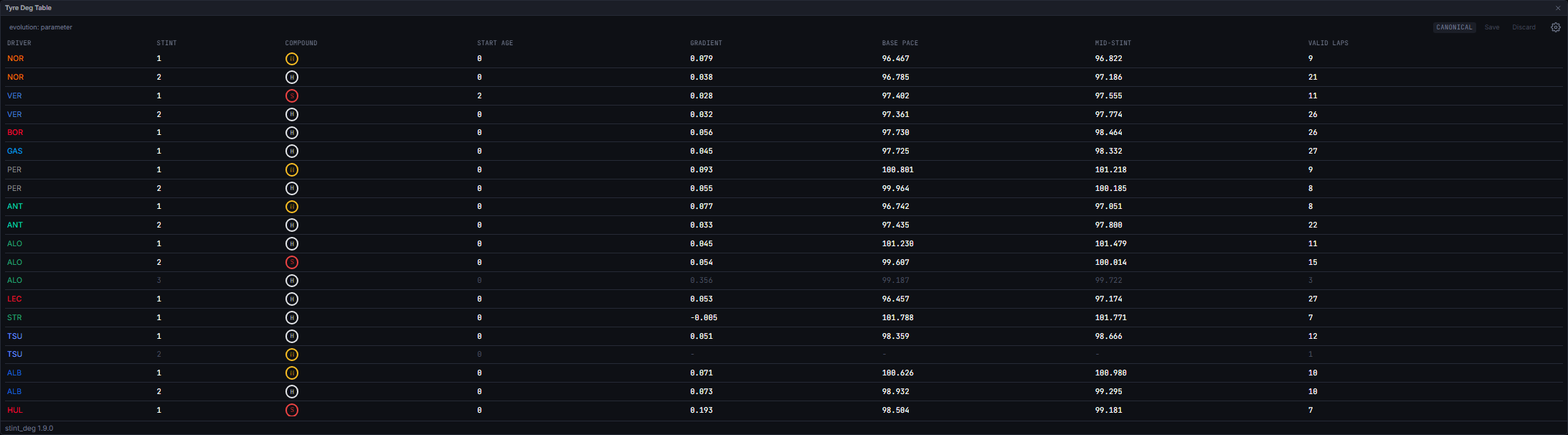
All second-valued columns show three decimal places, with a dash for a missing value rather than a fabricated
0.000.
Click any column header to sort: the first click sorts ascending, a second click flips to descending, and clicking a different column resets to ascending. Gradient, base pace and mid-stint pace sort with missing values always last, in either direction, so an unfittable stint can never read as the shallowest or steepest degradation.
Each row is draggable onto the Deg Fit Plot or Corrected Laps Plot. A stint currently loaded on those plots is pinned above the rest of the table (each block keeping its own column sort), highlighted, and given a right-edge ✕ to remove it from the plots without re-dragging.
A row whose fit reflects manually excluded or included laps (see below) is marked with a trailing * on its fit-backed cells; hovering shows how many laps were excluded and/or included, or “Reverted to automatic fit” if the manual overrides have since been undone.
The header row shows the corrections’ evolution provenance (evolution: parameter / estimate / none) so you can see when stints were corrected with no track evolution term at all. When there is something to save or discard, the header also hosts the save/discard control described under States below.
Data Behind It
Rows come from each driver’s latestinsight:stint_deg snapshot as of the playhead (model_id="stint_deg", model_version="1.9.0", trigger new_lap). stint_deg is driver-scoped: one snapshot per firing, for the triggering driver only. The fit itself is an ordinary least-squares regression of fuel- and evolution-corrected lap time against effective tyre life, over laps that clear the configurable outlier cutoff (default cutoff_pct 4.0%) and meet min_stint_laps (default 5) to count as a qualifying fit. The fuel and evolution correction maths itself is never re-derived here; see Fuel Correction.
The webapp subscribes to insight:stint_deg over WebSocket and hydrates the same data over REST (api.metrics(sessionKey, "stint_deg")) on session enter and on rehydrate, so a live stream and a REST snapshot converge on identical rows.
Manual lap exclusion/inclusion. Clicking a lap point on the Corrected Laps Plot toggles a manual override for that lap; this table’s *-marked rows reflect the resulting client-side refit. The refit mirrors the server’s post-correction fit maths exactly (never the fuel or evolution correction itself, which stays server-owned) and is persisted via PUT /v1/sessions/{session_key}/exclusions, a replace-set write of the full desired override list. See the Corrected Laps Plot’s page for the click workflow.
States
No insight yet / no analysed stints
No insight yet / no analysed stints
Before any driver’s
stint_deg snapshot has arrived, the table shows “No tyre degradation insight yet.” Once snapshots exist but carry no stints (not expected in practice, since the metric withholds entirely rather than firing empty), it shows “No analysed stints yet.”Stint below min_stint_laps
Stint below min_stint_laps
The row renders muted (dimmed text) with a tooltip: “Below min_stint_laps: no qualifying fit.” Gradient, base pace and mid-stint pace show as a dash.
Session gating: race and practice, never qualifying
Session gating: race and practice, never qualifying
The widget runs on race and practice sessions. In qualifying it renders a not-applicable state, because the metric itself returns nothing there: qualifying stints are too short and too unrepresentative to fit. On practice the fits are published uncorrected where the fuel load behind them is not known, and the widget says so rather than implying a correction that did not happen.
Live vs replay
Live vs replay
Identical: live and replay publish the same envelopes on the same channel, so the table behaves the same either way.
Unsaved changes and reconciliation
Unsaved changes and reconciliation
The header’s save/discard bar (hosted here, driven by manual lap overrides made on the Corrected Laps Plot) shows one of three states: Adjusted (an unsaved local diff; Save and Discard are both live), Reconciling (saved, but the latest
race_pace snapshot has not caught up yet; both buttons are inert), or Canonical (baseline and the server’s echo agree). The bar is hidden entirely when nothing has ever been excluded or included.Next Steps
Deg Fit Plot
See the fitted degradation lines for stints dragged from this table.
Corrected Laps Plot
Inspect and manually exclude or include the laps behind a fit.
Tyre Deg Ranking
Compare degradation across the whole field, per compound.
Fuel Correction
How lap times are corrected before they reach this table’s fits.