

Overview
Tyre Strategy shows the whole field’s stint sequence on one lap-number axis: every driver’s row is their stints laid out as compound-coloured blocks, so you can read undercut and overcut patterns, compound splits, and stop timing across the field at a glance. Reach for it whenever you need the race’s strategic shape rather than one driver’s detail.This is a race-only widget: outside a race session it shows “Session is not a race.” and computes nothing.
What It Shows
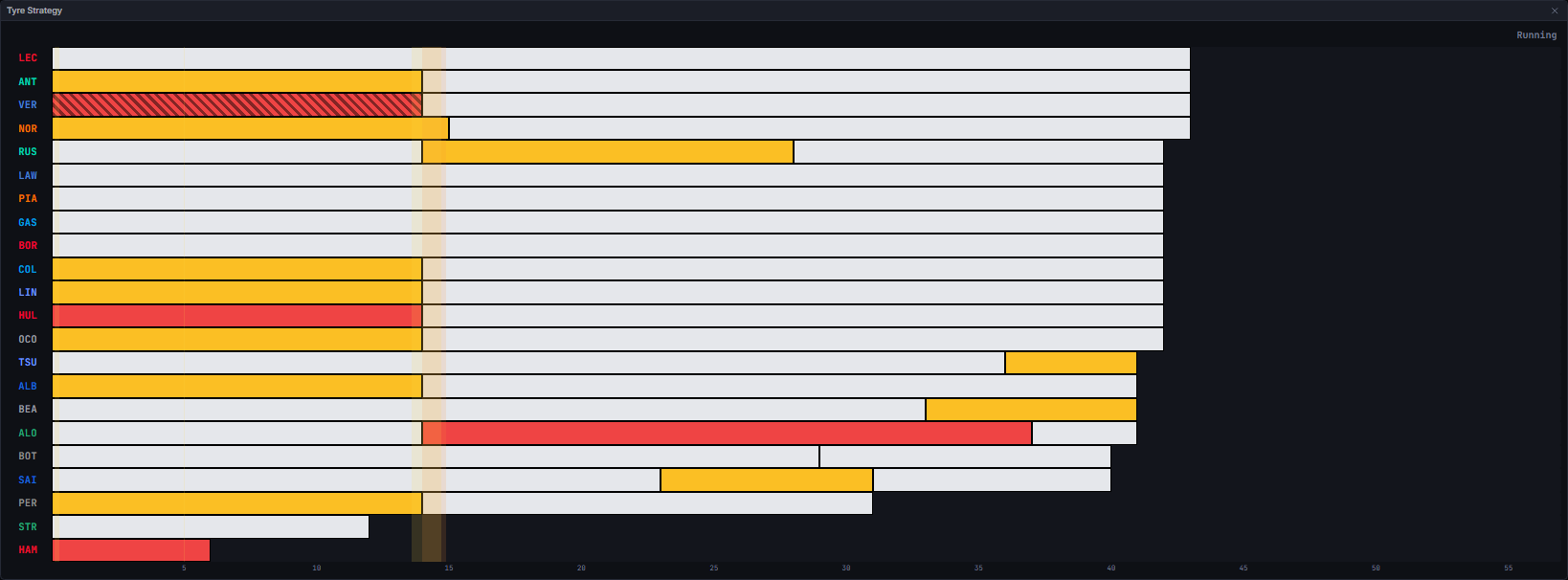
Hovering a segment is the only way to see its detail. Right-click a segment to open the compound picker and correct that stint’s tyre by hand: the same menu the timing tower’s badge and the Stints viewer open, offered here because the whole stint is already on screen.
Data Behind It
This widget has no dedicated insight and carries nomodel_id/model_version: it is a pure client-side derivation over the same stint rows the Stints widget reads, built by buildTyreStrategyColumns in src/screens/derive.ts.
- Rows:
GET /v1/sessions/{session_key}/stints, hydrated on session enter and re-hydrated on seek or reconnect. Stint rows carry no channel of their own on the wire; live updates arrive wrapped astiming-channel envelopes and route to the stint reducer by the presence of astint_numberfield. - Row membership and order: the builder returns rows in fixed car-number order; the running-order option re-orders them using the timing tower’s own entries, which is the one place in the app allowed to decide a running order.
- Compound: the stint row’s own compound, with a manual override for that stint winning and marked as edited.
- Flag bands:
buildStintFlags(safety car, virtual safety car, red flag periods, plus track-level sector-yellow spans) mapped onto the lap axis viabuildStintAxisLaps’s per-lap timing ticks - the identical overlay data the Stints widget’s own flag bands use. - Axis span:
transport.totalLapsfixes the axis to the full race; if that is not yet known, the axis falls back to the furthest lap any segment currently reaches.
States
Empty / no stints yet
Empty / no stints yet
Shows “No stints yet.” whenever no driver has a usable stint segment, or the axis span cannot be determined - typically the first laps of a race before any stint row has arrived.
Live vs replay
Live vs replay
Wire-identical: the widget reads the same stint rows and channel envelopes regardless of source, and never branches on it.
Session-type gating
Session-type gating
Race-only. Outside a race, the widget shows “Session is not a race.” - the app never computes the tyre-strategy data bundle for a non-race session.
Unknown compound or tyre age
Unknown compound or tyre age
An unreported compound renders a neutral grey block rather than a guessed colour. An unreported starting tyre age (
tyre_age_at_start) is never assumed to be a fresh set: the tooltip’s tyre-life reads ”?” instead of “new”.No flag overlay
No flag overlay
If flag data or lap-time ticks are not yet available, the overlay simply does not draw - not an error state, just nothing to show yet.
Open (current) stint
Open (current) stint
A driver’s latest stint grows lap by lap with the playhead and shrinks correctly on scrub-back. It is truncated so it never overlaps a successor stint that has already reported in, which can otherwise happen during a brief live coalescing window.
FAQ
Why is a segment hatched instead of a paler colour?
Why is a segment hatched instead of a paler colour?
A hatch marks a used set on the same base compound colour, so the compound stays legible at a glance regardless of wear. A paler “used” shade was tried and dropped because it made the compound itself harder to read.
Why does a segment's tyre life show a question mark?
Why does a segment's tyre life show a question mark?
The stint row did not report a starting tyre age. Rather than assume the set was fresh, the widget renders the honest “unknown” state.
Next Steps
Stints
The same stint data at per-lap detail, on a time-of-day axis.
Tyre Deg Table
Per-stint degradation fits for every driver.
Tyre Deg Ranking
Compound-by-compound degradation ranking across the field.
Race Control
The flag periods this widget’s overlay bands are drawn from.