

Overview
Stop Sensitivity plots how much a driver’s predicted total race time would change if a given stop happened on a different lap. Pick one or more drivers from the badge strip inside the widget to see one curve per (driver, stop index), with the driver’s own rank-1 predicted time marked as the optimum on its curve.The curve minimum should equal the driver’s rank-1 predicted time, within 0.001s, per the engine contract. The optimum marker doubles as a visible consistency check on that guarantee.
What It Shows
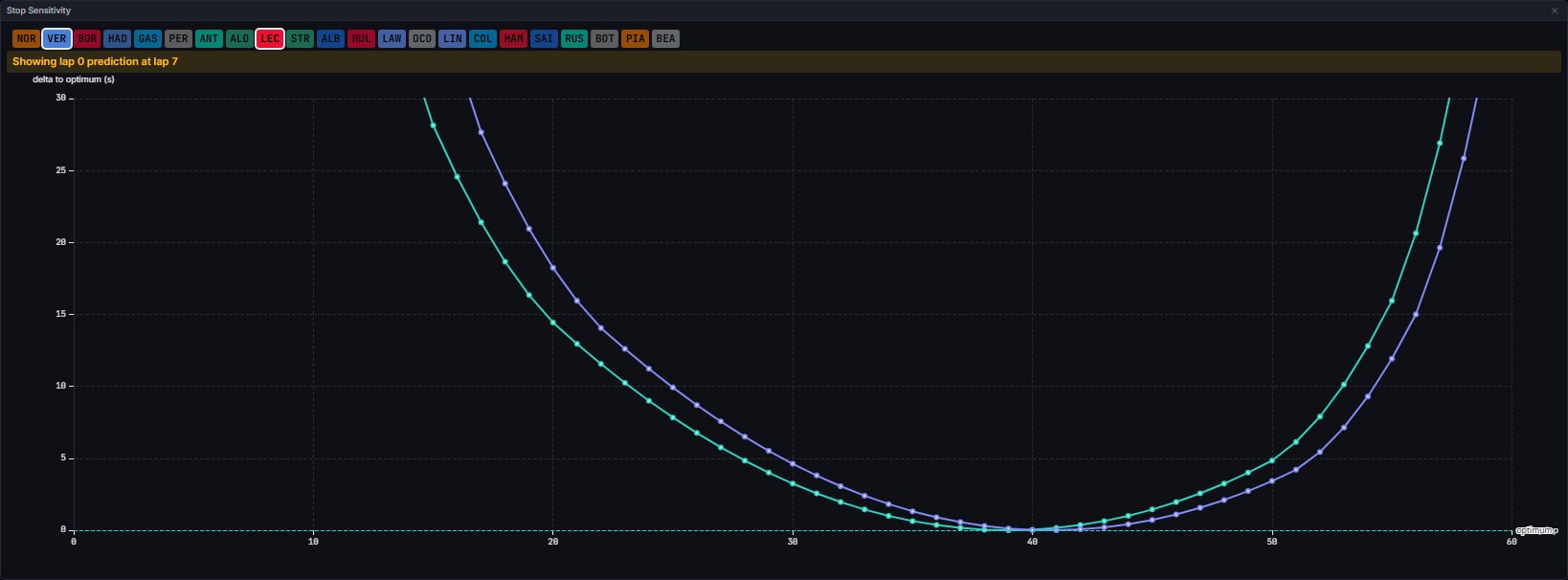
<driver> stop <index>, one line per stop in the driver’s rank-1 strategy, plotted with visible point markers. A dashed horizontal optimum mark line appears on a driver’s curve at their rank-1 predicted time, when that strategy is reachable.
Choosing drivers. A strip of driver badges (the three-letter code on the team colour, the same badge the Strategy Table uses) runs along the top of the widget, one for every driver in the strategy snapshot, so it works before the race starts too. Click a badge to add that driver to the comparison, and click it again to remove them. Selected badges carry a ring. A retired driver, or one with no strategy in the snapshot, is greyed out and cannot be clicked. Until you click a badge, the widget compares the predicted top two. The choice belongs to this widget alone: the Timing Tower selection does not change it, and it resets when you change session.
Zooming. Right-drag across the plot to draw a box, and on release the chart zooms both axes to it. The drag carries on if the pointer leaves the plot or the chart, and the zoom lands at the last point inside the plot when you let go. A right-click without moving opens a small menu with Reset zoom, which returns the chart to its opening view. Left-drag is unchanged and there are no zoom sliders.
Below the chart, a footer reports:
- how many unreachable points were dropped from the plotted curves, when any were;
- that the rank-1 strategy is unreachable and so has no optimum marker, when that is the case;
- an as-of stamp, when the snapshot behind the chart is stale relative to the playhead.
Data Behind It
Curves are built from the lateststrategy_snapshot’s sensitivity rows, at or before the playhead lap (the as-of rule), filtered to the drivers picked on the badge strip. model_id strategy_snapshot, model_version the composite engine_version+WRAPPER_VERSION, over vpw:v1:{session_key}:insight:strategy_snapshot, hydrated via REST on session enter and rehydrate, then live.
For each driver’s rank-1 strategy and each stop index, sensitivity gives the predicted total time if that one stop moved to a given lap, with the other stops held at their optimum. A point at or above the engine’s 1e300 unreachable threshold (“this stop lap cannot complete the strategy”) is dropped from the curve and counted rather than plotted at a nonsensical value. The optimum marker is the driver’s own rank-1 predicted_time; when that rank-1 strategy is itself unreachable, no marker is drawn and the footer says so instead.
States
No snapshot at all
No snapshot at all
Shows the shared empty-state text: the exact-lap status gate and reasons where known, or a generic “No strategy data at lap N.”
Snapshot present, no drivers selected
Snapshot present, no drivers selected
Shows “Select drivers above to compare stop sensitivity.”; no drivers means no curves to draw. This happens once you have clicked every selected badge off.
Drivers selected, no reachable points
Drivers selected, no reachable points
If the reason is specifically that the rank-1 strategy is unreachable, shows “Rank-1 strategy unreachable; no optimum marker.” Otherwise shows “No reachable sensitivity points.”
Stale snapshot
Stale snapshot
The chart still renders, with an as-of stamp in the footer: “Data as of lap N (playhead lap M)”.
Race-only
Race-only
Outside a race, renders “Session is not a race”; the app never computes a strategy bundle for a non-race session.
FAQ
Why is there no optimum marker on a driver's curve?
Why is there no optimum marker on a driver's curve?
That driver’s rank-1 strategy is currently unreachable from the race state (the engine’s
DBL_MAX sentinel). The footer states this explicitly rather than omitting the marker silently.Why does a curve have fewer points than expected?
Why does a curve have fewer points than expected?
Some candidate stop laps cannot complete that strategy from the current race state and are dropped, not plotted at an invented value. The footer reports how many were dropped.
Next Steps
Race Strategy Tool
The shared engine, derivation layer, and sentinel rule behind all six strategy widgets.
Strategy Table
The ranked strategies these curves are drawn from.
Predicted Pit Window and SC
Each driver’s next predicted stop, plus safety-car guidance.
Strategy Status
The gate, reasons, and whole-race health strip that explains a blank or stale chart.